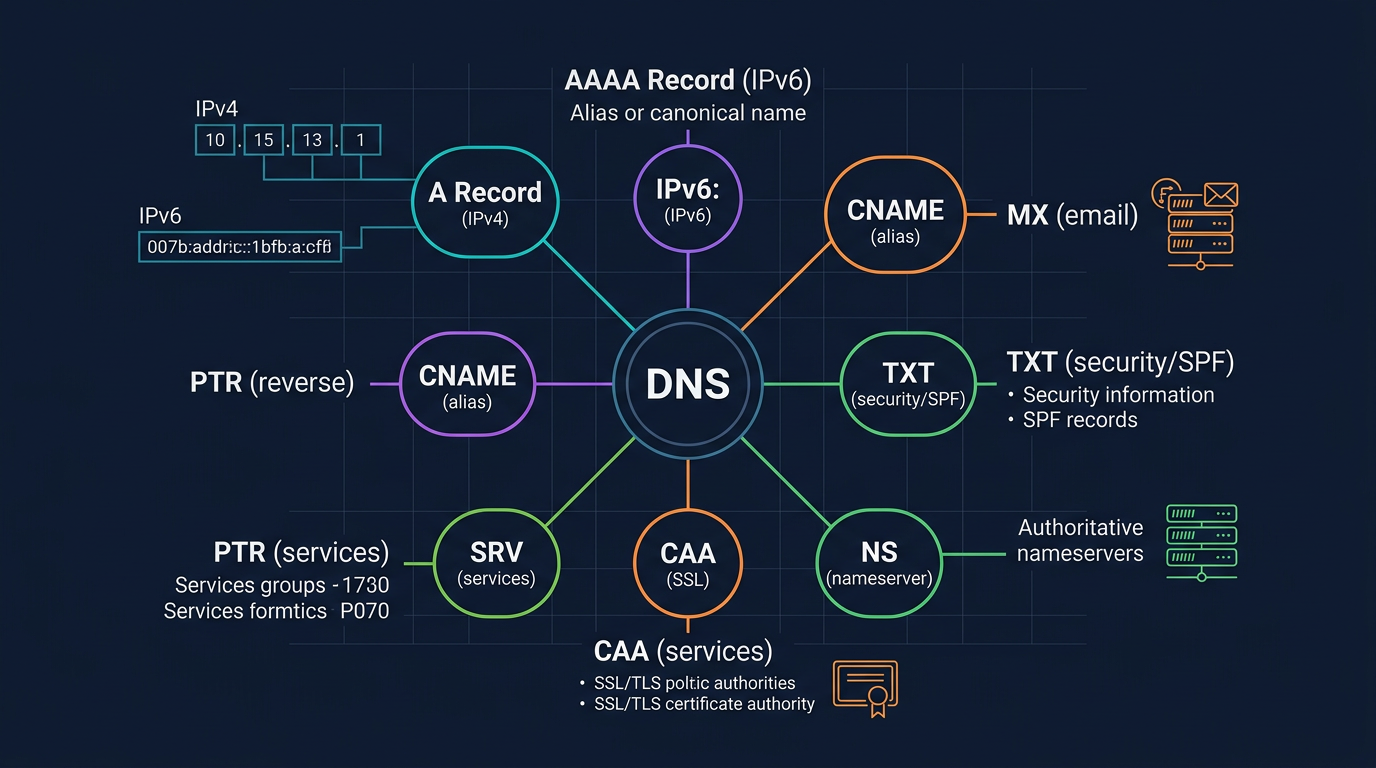
Key takeaway: DNS records are the bridge between your domain name and every internet service it powers. Correctly configuring A, CNAME, MX, TXT, and CAA records determines whether your website loads, email gets delivered, and SSL certificates issue successfully. Since February 2024, Google and Yahoo require SPF/DKIM/DMARC authentication for bulk senders – domains without proper email authentication records now face outright rejection.
After you register a domain, DNS records are what make it actually work. Whether you are launching a website, configuring business email, connecting a CDN, or verifying domain ownership, you need a solid understanding of each DNS record type and how to configure it correctly.
This guide walks through all 10 core DNS record types with exact configuration syntax, real-world examples, and the mistakes that catch even experienced administrators. It also covers the 2024 email authentication mandates and the CA/B Forum’s aggressive certificate validity reduction timeline that every domain owner must prepare for.
Quick Comparison Table: All 10 DNS Record Types
Before diving into each record, establish the full picture:
| Record Type | Core Function | Example Value | Usage Frequency |
|---|---|---|---|
| A | Domain to IPv4 address | 192.0.2.1 | Very High |
| AAAA | Domain to IPv6 address | 2001:db8::1 | High |
| CNAME | Domain alias to another domain | cdn.example.com | Very High |
| MX | Email routing | mail.example.com (priority 10) | High |
| TXT | Text-based verification data | v=spf1 include:… | Very High |
| NS | Authoritative nameserver delegation | ns1.cloudflare.com | Medium |
| SOA | Zone authority metadata | serial/refresh/retry | Low |
| PTR | IP to domain (reverse lookup) | mail.example.com | Medium |
| SRV | Service discovery (host + port) | sip.example.com:5060 | Medium |
| CAA | Restrict SSL certificate issuance | letsencrypt.org | High (rising) |
1. A Record: The Foundation of DNS Resolution
The A record (Address Record) is the most fundamental DNS record type. It maps a domain name directly to an IPv4 address, defined in RFC 1035.
Configuration Syntax
example.com. 3600 IN A 192.0.2.1
Field breakdown:
example.com.– Fully Qualified Domain Name (trailing dot indicates FQDN)3600– TTL (Time to Live) in seconds; how long resolvers cache this answerIN– Class (Internet)A– Record type192.0.2.1– Target IPv4 address
Practical Examples
Single server hosting:
example.com.        300     IN    A    203.0.113.50
www.example.com.    300     IN    A    203.0.113.50
Round-robin load balancing (multiple A records):
example.com.    300    IN    A    203.0.113.50
example.com.    300    IN    A    203.0.113.51
example.com.    300    IN    A    203.0.113.52
Common Mistakes
- Using a CNAME at the zone apex instead of A. The DNS specification (RFC 1034 Section 3.6.2) prohibits CNAME records at the root domain because they conflict with SOA and NS records. Use an A record (or your provider’s ALIAS/ANAME flattening feature) at the apex.
- Setting TTL too high before a migration. If you plan to change IPs, reduce TTL to 300 seconds at least 48 hours before the switch.
- Forgetting to update both
@andwww. Users expect both to resolve.
2. AAAA Record: IPv6 Resolution
The AAAA record (defined in RFC 3596) serves the same purpose as the A record but maps to an IPv6 address. The name “AAAA” reflects that IPv6 addresses are four times longer than IPv4.
Configuration Syntax
example.com. 3600 IN AAAA 2001:0db8:85a3::8a2e:0370:7334
Practical Example
Dual-stack configuration (A + AAAA together):
example.com.    300    IN    A       203.0.113.50
example.com.    300    IN    AAAA    2001:db8:1::50
Common Mistakes
- Omitting AAAA records entirely. As of 2025, over 40% of global internet traffic uses IPv6. Mobile networks (T-Mobile, Reliance Jio) default to IPv6.
- Misformatting compressed notation. You can only use the
::shorthand once per address.2001::db8::1is invalid.
3. CNAME Record: Domain Aliasing
The CNAME record (Canonical Name Record) creates an alias that points one domain name to another. The resolver then follows the chain to find the final A/AAAA record.
Configuration Syntax
blog.example.com. 3600 IN CNAME example.github.io.
Practical Examples
CDN integration:
static.example.com. 300 IN CNAME d1234.cloudfront.net.
SaaS platform hosting:
shop.example.com.     3600    IN    CNAME    shops.myshopify.com.
help.example.com.     3600    IN    CNAME    example.zendesk.com.
Common Mistakes
- CNAME at the zone apex. As mentioned above,
example.com. IN CNAME something.else.violates the RFC. Many DNS providers offer proprietary solutions (Cloudflare’s CNAME flattening, Route 53’s ALIAS record, DNS Made Easy’s ANAME). - CNAME coexisting with other record types. A CNAME record cannot share a name with any other record type (MX, TXT, A, etc.). If you need
mail.example.comto have both a CNAME and an MX record, it will not work – use an A record instead. - CNAME chains. While technically valid, chaining CNAMEs (A points to B points to C) adds latency and fragility. Keep chains to a single hop.
4. MX Record: Email Routing
The MX record (Mail Exchanger) tells sending mail servers where to deliver email for your domain. Each MX record includes a priority value – lower numbers indicate higher preference.
Configuration Syntax
example.com.    3600    IN    MX    10 mail1.example.com.
example.com.    3600    IN    MX    20 mail2.example.com.
Practical Examples
Google Workspace:
example.com.    3600    IN    MX    1  aspmx.l.google.com.
example.com.    3600    IN    MX    5  alt1.aspmx.l.google.com.
example.com.    3600    IN    MX    5  alt2.aspmx.l.google.com.
example.com.    3600    IN    MX    10 alt3.aspmx.l.google.com.
example.com.    3600    IN    MX    10 alt4.aspmx.l.google.com.
Microsoft 365:
example.com. 3600 IN MX 0 example-com.mail.protection.outlook.com.
Common Mistakes
- Pointing MX to a CNAME. RFC 2181 Section 10.3 requires MX targets to be A/AAAA records, not CNAMEs. While some servers tolerate this, it can cause delivery failures.
- Missing A/AAAA records for MX targets. If
mail.example.comhas no A record, email delivery fails entirely. - Identical priority values without understanding. Same-priority MX records trigger random distribution, not failover. Use different priorities for primary/backup semantics.
5. TXT Record: Verification and Authentication
The TXT record stores arbitrary text data associated with a domain. Originally defined for human-readable notes, it has become critical infrastructure for domain verification, email authentication (SPF, DKIM, DMARC), and security policies.
Configuration Syntax
example.com. 3600 IN TXT "v=spf1 include:_spf.google.com ~all"
Practical Examples
Domain ownership verification (Google Search Console):
example.com. 3600 IN TXT "google-site-verification=abc123xyz..."
Multiple TXT records (perfectly valid):
example.com.    3600    IN    TXT    "v=spf1 include:_spf.google.com ~all"
example.com.    3600    IN    TXT    "google-site-verification=abc123xyz"
example.com.    3600    IN    TXT    "facebook-domain-verification=def456"
Common Mistakes
- Exceeding 255-character limit per string. A single TXT record can hold multiple 255-byte strings concatenated (total up to ~64KB), but some DNS providers only expose one string field. Wrap long values in multiple quoted strings:
"string1" "string2". - Multiple SPF records. You may only have ONE TXT record starting with
v=spf1. Multiple SPF records cause a PermError (RFC 7208 Section 3.2). Merge them into a single record usinginclude:mechanisms.
6. NS Record: Nameserver Delegation
The NS record (Name Server) delegates a DNS zone to specific authoritative nameservers. These records exist at two levels: the parent zone (registry) and your zone itself.
Configuration Syntax
example.com.    86400    IN    NS    ns1.cloudflare.com.
example.com.    86400    IN    NS    ns2.cloudflare.com.
Subdomain delegation:
api.example.com.    3600    IN    NS    ns1.api-provider.com.
api.example.com.    3600    IN    NS    ns2.api-provider.com.
Common Mistakes
- Changing NS records at the DNS provider instead of the registrar. The NS records that matter for delegation are maintained at the parent zone (your registrar). Updating NS records only in your zone file without changing registrar settings accomplishes nothing.
- Using fewer than two nameservers. RFC 1034 recommends at least two geographically diverse nameservers for redundancy.
7. SOA Record: Zone Authority Metadata
The SOA record (Start of Authority) contains administrative information about the DNS zone. Every zone must have exactly one SOA record. It controls how secondary nameservers synchronize with the primary.
Configuration Syntax
example.com.    86400    IN    SOA    ns1.example.com. admin.example.com. (
                                      2024052201  ; Serial number (YYYYMMDDNN)
                                      7200        ; Refresh (2 hours)
                                      3600        ; Retry (1 hour)
                                      1209600     ; Expire (14 days)
                                      300         ; Minimum TTL / Negative caching
                                      )
Key Fields
| Field | Purpose | Recommended Value |
|---|---|---|
| Serial | Version number; increment on every change | YYYYMMDDNN format |
| Refresh | How often secondaries check for updates | 3600-7200s |
| Retry | Retry interval if refresh fails | 900-3600s |
| Expire | When secondaries stop answering if primary unreachable | 1209600s (14 days) |
| Minimum | Negative response caching duration | 300-3600s |
Common Mistakes
- Forgetting to increment the serial number. Secondary nameservers compare serial numbers to decide whether to transfer updated records. If you edit the zone but leave the serial unchanged, secondaries serve stale data.
- Setting expire too low. If your primary goes down for maintenance, a low expire value means secondaries stop serving your zone entirely.
8. PTR Record: Reverse DNS Lookup
The PTR record (Pointer Record) maps an IP address back to a domain name – the reverse of an A record. It exists in the special in-addr.arpa (IPv4) or ip6.arpa (IPv6) zone.
Configuration Syntax
50.113.0.203.in-addr.arpa. 3600 IN PTR mail.example.com.
Note the reversed IP octet order: 203.0.113.50 becomes 50.113.0.203.in-addr.arpa.
Why PTR Records Matter
- Email deliverability. Receiving mail servers perform reverse DNS lookups to verify the sending server’s identity. A mismatch between the PTR record and the server’s HELO/EHLO hostname triggers spam scores.
- Logging and diagnostics. Traceroute and log analysis tools use PTR records to display hostnames instead of raw IPs.
Common Mistakes
- Not requesting PTR records from your hosting provider. PTR records are managed by whoever owns the IP block (your ISP or cloud provider), not in your domain’s zone. You typically submit a support ticket to configure them.
- PTR/A record mismatch. The PTR should resolve to a hostname that has a matching A record pointing back to the same IP (forward-confirmed reverse DNS, or FCrDNS).
9. SRV Record: Service Discovery
The SRV record (Service Record), defined in RFC 2782, enables clients to discover the host and port for specific services. It is widely used for VoIP (SIP), XMPP, LDAP, and Microsoft Active Directory.
Configuration Syntax
_service._protocol.example.com. TTL IN SRV priority weight port target
Practical Examples
SIP (VoIP) service:
_sip._tcp.example.com.    3600    IN    SRV    10 60 5060 sipserver1.example.com.
_sip._tcp.example.com.    3600    IN    SRV    10 40 5060 sipserver2.example.com.
XMPP (Jabber) messaging:
_xmpp-server._tcp.example.com.    3600    IN    SRV    5 0 5269 xmpp.example.com.
_xmpp-client._tcp.example.com.    3600    IN    SRV    5 0 5222 xmpp.example.com.
Microsoft 365 Autodiscover:
_autodiscover._tcp.example.com. 3600 IN SRV 0 0 443 autodiscover.outlook.com.
Field Meanings
- Priority – Lower value = tried first (like MX)
- Weight – Load distribution among same-priority targets (higher = more traffic)
- Port – TCP/UDP port number for the service
- Target – The hostname providing the service
Common Mistakes
- Forgetting the underscore prefix. Service and protocol names MUST start with
_(e.g.,_sip._tcp), or clients will not find them. - Pointing target to a CNAME. Like MX, SRV targets must resolve to A/AAAA records.
10. CAA Record: Certificate Authority Authorization
The CAA record (Certification Authority Authorization), defined in RFC 8659, specifies which Certificate Authorities (CAs) are permitted to issue SSL/TLS certificates for your domain. CAs are required to check CAA records before issuance since September 2017 (CA/B Forum Ballot 187).
Configuration Syntax
example.com.    3600    IN    CAA    0 issue "letsencrypt.org"
example.com.    3600    IN    CAA    0 issuewild "letsencrypt.org"
example.com.    3600    IN    CAA    0 iodef "mailto:security@example.com"
Tag Types
| Tag | Purpose |
|---|---|
issue | Authorize a CA for standard certificates |
issuewild | Authorize a CA for wildcard certificates |
iodef | Incident reporting endpoint (email or URL) |
Practical Examples
Allow only Let’s Encrypt and DigiCert:
example.com.    3600    IN    CAA    0 issue "letsencrypt.org"
example.com.    3600    IN    CAA    0 issue "digicert.com"
example.com.    3600    IN    CAA    0 issuewild "letsencrypt.org"
example.com.    3600    IN    CAA    0 iodef "mailto:certs@example.com"
Block all certificate issuance (useful for domains that should never have certificates):
parked-domain.com. 3600 IN CAA 0 issue ";"
CA/B Forum Ballot SC-081v3: Certificate Validity Reduction Timeline
In April 2025, the CA/Browser Forum passed Ballot SC-081v3, mandating an aggressive reduction in maximum TLS certificate validity:
| Effective Date | Maximum Validity | Maximum DCV Reuse |
|---|---|---|
| March 15, 2026 | 200 days | 200 days |
| March 15, 2027 | 100 days | 100 days |
| March 15, 2029 | 47 days | 10 days |
What this means for you:
- Automation is no longer optional. Manual certificate renewal becomes operationally impossible at 47-day validity. Deploy ACME clients (certbot, acme.sh) now.
- CAA records become more critical. With frequent automated renewals, a misconfigured CAA record will block certificate issuance and cause outages.
- Domain Control Validation (DCV) reuse shrinks. By 2029, you must re-prove domain ownership every 10 days, making reliable DNS infrastructure essential.
If you are selecting a domain for a new project, choosing a registrar with robust DNS management and API access for automation will save significant operational pain. Platforms like Nameslink provide DNS API access alongside domain registration, enabling automated certificate workflows from day one.
Email Authentication: SPF, DKIM, and DMARC
The 2024 Google/Yahoo Mandate
Since February 1, 2024, Google and Yahoo enforce strict email authentication requirements for bulk senders (those sending more than 5,000 emails per day to Gmail/Yahoo addresses):
- SPF or DKIM authentication – required for all senders
- DMARC policy – required for bulk senders
- One-click unsubscribe – required for marketing emails
- Spam complaint rate below 0.3% – enforced threshold
Non-compliant domains face temporary errors (4xx), outright rejection (5xx), or spam folder placement.
SPF (Sender Policy Framework)
SPF (RFC 7208) defines which mail servers are authorized to send email on behalf of your domain.
example.com. 3600 IN TXT "v=spf1 include:_spf.google.com include:sendgrid.net ip4:203.0.113.50 -all"
Mechanism breakdown:
v=spf1– Version identifier (mandatory, must appear once)include:_spf.google.com– Authorize Google Workspace serversinclude:sendgrid.net– Authorize SendGrid for transactional emailip4:203.0.113.50– Authorize a specific IP-all– Reject all other sources (hard fail)
SPF qualifier reference:
| Qualifier | Meaning | Recommendation |
|---|---|---|
+all | Allow everything | Never use |
~all | Soft fail (mark as suspicious) | Acceptable during testing |
-all | Hard fail (reject) | Production standard |
?all | Neutral | Not useful |
Critical constraint: the 10-lookup limit. SPF evaluation allows a maximum of 10 DNS lookups (including nested includes). Exceeding this causes a PermError. Monitor your lookup count with:
dig +short TXT _spf.google.com
# Then recursively check each include
DKIM (DomainKeys Identified Mail)
DKIM (RFC 6376) adds a cryptographic signature to outgoing emails, allowing recipients to verify the message was not altered in transit.
The DKIM public key is published as a TXT record at a selector-specific subdomain:
selector1._domainkey.example.com. 3600 IN TXT "v=DKIM1; k=rsa; p=MIGfMA0GCSqGSIb3DQEBAQUAA4GNADCBiQ..."
Field breakdown:
selector1– Selector name (set by your email provider; allows key rotation without disruption)_domainkey– Fixed namespacev=DKIM1– Versionk=rsa– Key type (rsa or ed25519)p=...– Base64-encoded public key
Google Workspace DKIM example:
google._domainkey.example.com. 3600 IN TXT "v=DKIM1; k=rsa; p=MIIBIjANBgkqhkiG9w0BAQEFAAOCAQ8AMIIBCgKCAQEA..."
DMARC (Domain-based Message Authentication, Reporting, and Conformance)
DMARC (RFC 7489) ties SPF and DKIM together with a policy that tells receivers what to do when authentication fails, and where to send reports.
_dmarc.example.com. 3600 IN TXT "v=DMARC1; p=reject; rua=mailto:dmarc-reports@example.com; ruf=mailto:dmarc-forensics@example.com; pct=100; adkim=s; aspf=s"
Policy options:
| Policy | Action | When to Use |
|---|---|---|
p=none | Monitor only (collect reports) | Initial deployment; discovery phase |
p=quarantine | Mark as spam | Intermediate step; gaining confidence |
p=reject | Reject outright | Production standard for bulk senders |
Recommended deployment path:
- Start with
p=none– collect reports for 2-4 weeks to identify all legitimate sending sources - Move to
p=quarantine; pct=25– gradually increase percentage - Final state:
p=reject; pct=100– full enforcement
Complete Email Authentication Setup
Here is a production-ready email authentication configuration for a domain using Google Workspace and SendGrid:
; SPF - Authorize Google and SendGrid
example.com.    3600    IN    TXT    "v=spf1 include:_spf.google.com include:sendgrid.net -all"

; DKIM - Google Workspace key
google._domainkey.example.com.    3600    IN    TXT    "v=DKIM1; k=rsa; p=MIIBIjANBgkqh..."

; DKIM - SendGrid key
s1._domainkey.example.com.    3600    IN    TXT    "k=rsa; t=s; p=MIGfMA0GCSqGSIb3..."

; DMARC - Full enforcement with reporting
_dmarc.example.com.    3600    IN    TXT    "v=DMARC1; p=reject; rua=mailto:dmarc@example.com; pct=100; adkim=s; aspf=s"
Decision Tree: Which DNS Record Type Do You Need?
Use this decision framework to determine the correct record type for any scenario:
What are you trying to do?
|
|-- Point domain to a server IP?
|   |-- IPv4 address? --> A record
|   |-- IPv6 address? --> AAAA record
|
|-- Point domain to another domain name?
|   |-- At the zone apex (@)? --> A record + provider ALIAS/CNAME flattening
|   |-- At a subdomain? --> CNAME record
|
|-- Set up email?
|   |-- Route incoming mail? --> MX record
|   |-- Authorize sending servers? --> TXT record (SPF)
|   |-- Sign outgoing messages? --> TXT record (DKIM at selector._domainkey)
|   |-- Set authentication policy? --> TXT record (DMARC at _dmarc)
|   |-- Enable reverse DNS for mail server? --> PTR record
|
|-- Control SSL/TLS certificates?
|   --> CAA record
|
|-- Discover a service with host + port?
|   --> SRV record
|
|-- Delegate a subdomain to different nameservers?
|   --> NS record
|
|-- Verify domain ownership for a platform?
|   --> TXT record (with platform-provided value)
Full Practical Setup: Website + Email + Security
Here is a complete, production-grade DNS configuration for example.com running a website on a cloud server, using Google Workspace for email, and following security best practices:
; === ZONE AUTHORITY ===
example.com.    86400    IN    SOA    ns1.dnsprovider.com. admin.example.com. (
                                      2024052201 7200 3600 1209600 300)
example.com.    86400    IN    NS     ns1.dnsprovider.com.
example.com.    86400    IN    NS     ns2.dnsprovider.com.

; === WEBSITE ===
example.com.        300     IN    A       203.0.113.50
example.com.        300     IN    AAAA    2001:db8:1::50
www.example.com.    300     IN    CNAME   example.com.

; === CDN / STATIC ASSETS ===
static.example.com.    300    IN    CNAME    d1234abcd.cloudfront.net.

; === EMAIL ROUTING (Google Workspace) ===
example.com.    3600    IN    MX    1  aspmx.l.google.com.
example.com.    3600    IN    MX    5  alt1.aspmx.l.google.com.
example.com.    3600    IN    MX    5  alt2.aspmx.l.google.com.
example.com.    3600    IN    MX    10 alt3.aspmx.l.google.com.
example.com.    3600    IN    MX    10 alt4.aspmx.l.google.com.

; === EMAIL AUTHENTICATION ===
example.com.    3600    IN    TXT    "v=spf1 include:_spf.google.com -all"
google._domainkey.example.com.    3600    IN    TXT    "v=DKIM1; k=rsa; p=MIIBIjANBgkqh..."
_dmarc.example.com.    3600    IN    TXT    "v=DMARC1; p=reject; rua=mailto:dmarc@example.com; pct=100"

; === SECURITY ===
example.com.    3600    IN    CAA    0 issue "letsencrypt.org"
example.com.    3600    IN    CAA    0 issuewild "letsencrypt.org"
example.com.    3600    IN    CAA    0 iodef "mailto:security@example.com"

; === SERVICE DISCOVERY ===
_autodiscover._tcp.example.com.    3600    IN    SRV    0 0 443 autodiscover.outlook.com.
When building out a new domain’s DNS from scratch, having all records planned before going live prevents the cascading issues that come from piecemeal configuration. If you are still in the domain selection phase, tools that let you search availability across 1,500+ TLDs help you find the right domain before investing time in DNS architecture.
Troubleshooting Tools and Commands
dig (DNS Information Groper)
The dig command is the standard tool for DNS troubleshooting on Linux and macOS.
Query a specific record type:
dig example.com A
dig example.com AAAA
dig example.com MX
dig example.com TXT
dig example.com CAA
dig _dmarc.example.com TXT
Query a specific nameserver (bypass cache):
dig @8.8.8.8 example.com A
dig @ns1.cloudflare.com example.com A +norecurse
Trace the full resolution path:
dig example.com A +trace
Short output (just the answer):
dig +short example.com A
# Output: 203.0.113.50
Check SOA serial number:
dig example.com SOA +short
# Output: ns1.example.com. admin.example.com. 2024052201 7200 3600 1209600 300
nslookup (Cross-Platform)
Available on Windows, macOS, and Linux:
nslookup -type=MX example.com
nslookup -type=TXT example.com
nslookup -type=CAA example.com 8.8.8.8
Verify SPF Lookup Count
# Count total DNS lookups in your SPF chain
dig +short TXT example.com | grep spf
# Then recursively resolve each include:
dig +short TXT _spf.google.com
Test DMARC Record
dig +short TXT _dmarc.example.com
# Expected: "v=DMARC1; p=reject; rua=mailto:dmarc@example.com; pct=100"
Check Propagation Status
After making DNS changes, verify propagation across multiple resolvers:
dig @8.8.8.8 example.com A +short        # Google
dig @1.1.1.1 example.com A +short        # Cloudflare
dig @208.67.222.222 example.com A +short  # OpenDNS
dig @9.9.9.9 example.com A +short        # Quad9
TTL Best Practices
TTL (Time to Live) controls how long DNS resolvers cache your records. Choosing the right TTL is a balance between performance (longer = fewer queries, faster resolution for users) and agility (shorter = faster propagation of changes).
Recommended TTL Values
| Scenario | Recommended TTL | Reasoning |
|---|---|---|
| Stable production records | 3600s (1 hour) | Good cache performance; changes propagate within an hour |
| Records that rarely change (NS, MX) | 86400s (24 hours) | Maximum caching for stable infrastructure |
| Pre-migration (lower 48h before change) | 300s (5 minutes) | Ensures fast propagation when the change happens |
| During active migration | 60-300s | Minimize stale cache impact |
| Load-balanced A records | 60-300s | Allows quick failover |
| Development/testing | 60s (1 minute) | Rapid iteration |
TTL Strategy for Migrations
- 48 hours before: Lower TTL from 3600 to 300 on all records you plan to change
- Wait for old TTL to expire: Old caches must flush (wait the full previous TTL duration)
- Make the change: Update the record values
- Verify propagation: Use dig against multiple resolvers
- After stabilization: Raise TTL back to production values (3600-86400)
Frequently Asked Questions
Can I have both a CNAME and an MX record on the same subdomain?
No. The DNS specification (RFC 1034) states that a CNAME record cannot coexist with any other record type at the same name. If mail.example.com has a CNAME, you cannot add MX, TXT, or A records to it. Use an A record instead of a CNAME if you need other record types at that name.
How long do DNS changes take to propagate globally?
Typically 5 minutes to 48 hours, depending entirely on the previous TTL value of the record you changed. If the old record had a TTL of 86400 seconds (24 hours), some resolvers may serve the old value for up to 24 hours. This is why lowering TTL before planned changes is critical. In practice, with a 300-second TTL, most users see the new value within 10 minutes.
Do I need both an A record and a CNAME for www?
You need one or the other, not both. The standard approach is to use an A record on the apex (example.com) and a CNAME on www.example.com pointing to example.com. This way, updating the IP in one place updates both. Alternatively, use A records on both if you prefer explicit control.
What happens if I have no CAA records?
Any CA can issue certificates for your domain. The absence of CAA records is treated as implicit authorization for all Certificate Authorities. While this was acceptable in the past, the trend toward shorter certificate lifetimes and automated issuance makes CAA records increasingly important to prevent unauthorized certificate issuance (intentional or accidental).
How do I know if my SPF record is causing email delivery failures?
Check DMARC aggregate reports and use diagnostic tools. DMARC reports (sent to the rua address) contain SPF pass/fail data for every email sent from your domain. You can also test manually:
# Check your SPF record syntax
dig +short TXT example.com | grep "v=spf1"

# Verify lookup count (must be <= 10)
# Use an online SPF validator like mxtoolbox.com/spf.aspx
Common causes of SPF failure: exceeding the 10-lookup limit, forgetting to include a third-party sender (marketing platform, CRM, helpdesk), or using +all instead of -all.
Understanding Domain Value Through DNS Configuration
A domain’s DNS setup reflects its operational maturity. When evaluating a domain – whether for acquisition, investment, or competitive analysis – examining its DNS records reveals infrastructure choices, email providers, CDN usage, and security posture.
If you are assessing a domain’s overall value and operational history, comprehensive domain appraisal tools that analyze across 22 metrics can provide structured valuation alongside the technical DNS analysis you perform manually.
References and Standards
| Standard | Title | Relevance |
|---|---|---|
| RFC 1034 | Domain Names - Concepts and Facilities | Core DNS architecture; CNAME restrictions |
| RFC 1035 | Domain Names - Implementation and Specification | A record, NS record, SOA record format |
| RFC 2181 | Clarifications to the DNS Specification | MX target requirements |
| RFC 2782 | A DNS RR for specifying the location of services (SRV) | SRV record format |
| RFC 3596 | DNS Extensions to Support IPv6 | AAAA record definition |
| RFC 6376 | DomainKeys Identified Mail (DKIM) Signatures | DKIM specification |
| RFC 7208 | Sender Policy Framework (SPF) | SPF record format and evaluation |
| RFC 7489 | DMARC - Domain-based Message Authentication | DMARC specification |
| RFC 8659 | DNS Certification Authority Authorization (CAA) | CAA record format |
| CA/B Forum Ballot 187 | Make CAA Checking Mandatory | CAA enforcement since Sept 2017 |
| CA/B Forum Ballot SC-081v3 | Reduce Certificate Lifetimes | 200/100/47-day validity timeline |
| Google Bulk Sender Guidelines (2024) | Email Authentication Requirements | SPF/DKIM/DMARC mandate for >5000 emails/day |
Summary
DNS records are not just technical plumbing – they are the operational backbone of every service your domain provides. The ten record types covered in this guide span the full spectrum from basic resolution (A/AAAA) through email deliverability (MX/TXT with SPF/DKIM/DMARC) to security policy (CAA).
Three developments make DNS mastery more urgent than ever:
- The 2024 email authentication mandate means improperly configured TXT records directly cause business email to be rejected by Google and Yahoo.
- The CA/B Forum’s certificate validity reduction (reaching 47 days by March 2029) means your DNS infrastructure must support reliable, automated certificate renewal.
- IPv6 adoption crossing the tipping point means AAAA records are no longer optional for sites serving mobile-heavy audiences.
Get your DNS right from the start. The configuration patterns in this guide represent current best practice – apply them as a checklist whenever you bring a new domain into production.